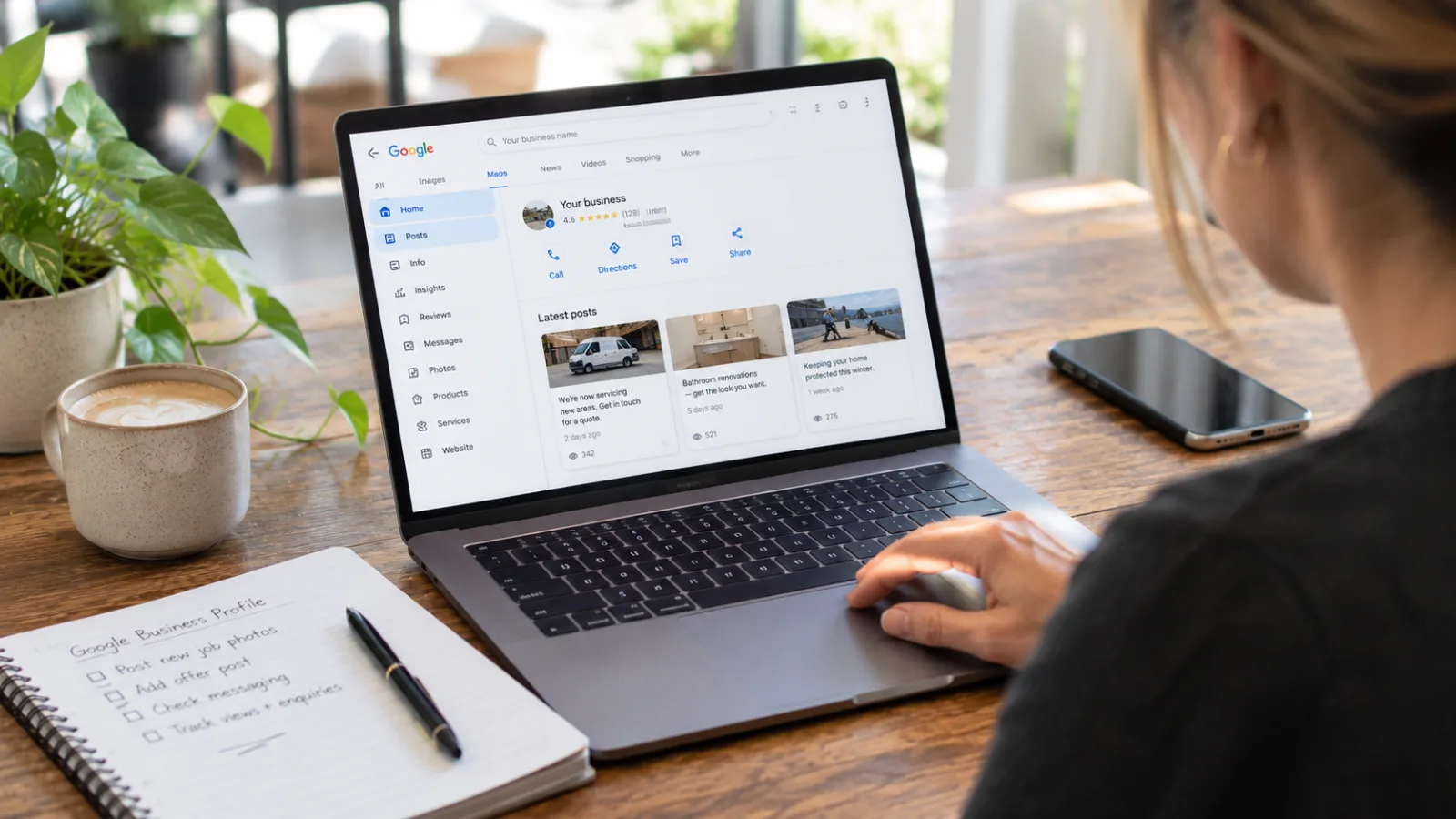
Google Business Profile post views now show on your posts. Here’s what they tell you, what they don’t, and how to turn those views into real enquiries.
Since early 2023, posting on your Google Business Profile has been a bit like shouting into a paddock. You’d put up a job photo or a weekly special and have no idea if anyone saw it.
That’s changed. Google has brought back Google Business Profile post views, a count on each post showing how often it’s been seen across Search and Maps. It’s useful, and it’s easy to misread. A view isn’t a call, and Google still won’t tell you who clicked.
Here’s where to find the number, how to read it, and how to turn views into actual enquiries.
Where to find your Google Business Profile post views
Open the Google account that manages your Business Profile. Search your business name on Google while signed in, then open your posts. Each post shows a view count, covering updates, offers and events from the last 18 months.
It’s one number per post. Google combines views from Search and Maps, so you don’t need to check both. It’s also only in your dashboard, so most reporting tools can’t pull it in yet.
If you can see a view total on a post, take a screenshot and write down the number.
- →Search your business name while signed into the account that manages the profile.
- →Open recent posts and look for the view count on each post.
- →Record the date, post type and view total in one simple sheet.
- →If views aren’t visible, check again in a week or two. Google says it’s still rolling out worldwide.
Views tell you a post got in front of people. They don’t tell you those people rang, booked or bought.
Treat views as the first number, not the finish line
A view is useful because it tells you your post had a chance to do its job. It can help you spot which topics, photos and offers get shown more often.
Ready to grow?
Book a free strategy session with a local specialist.
It can’t tell you intent on its own. A Ballarat sparky’s switchboard photo may pull plenty of views, but an emergency call matters more than a popular photo.
And Google hasn’t brought back post clicks. It used to show them, then dropped them along with views in 2023. Only views have returned, so if you want to know whether a post sent anyone to your website, you’ll need to track it yourself.
You won’t always know the exact source of every lead. Ask new callers how they found you. A Newcastle cleaner can add a simple question: “Did you find us on Google?”
Mix offers, updates and finished jobs
You don’t need to post every day. A steady mix of offers, updates and proof of work keeps your profile fresh, and job photos are the easiest place to start.
Proof-of-work posts show what you actually do
Show finished work, your team on site, a new menu item or a before-and-after result. A Gold Coast tiler could post a clean photo of a completed bathroom and say what problem was fixed.
Get permission before showing a customer’s property, face or identifying details. A job photo is more useful when the caption explains the result in plain English.
Write posts for the person ready to choose
People scanning your profile want a quick answer. They’re checking if you’re open, nearby, credible and able to help with their exact problem.
Keep the first line concrete. “Leaking hot-water system repaired in Wagga Wagga this morning” gives more confidence than “Another happy customer”.
Use a clear photo and a clear action. A restaurant with a Friday seafood special can link to its booking page, rather than sending people hunting through a menu.
- →Name the service, product or problem.
- →Add the local detail only where it helps, such as a service area or suburb.
- →Use a recent, clear photo taken by your team.
- →Give one next step: call, book, get a quote or see the full details.
- →Avoid stuffing the post with every service you offer.
Fix the basics before blaming the posts
Posts sit alongside the rest of your Google profile. A sharp offer won’t rescue a profile with the wrong phone number, old hours or no recent reviews.
Before posting, check your main business details, service categories, website link and booking link. A Hobart café that sends people to an expired menu page loses the benefit of a good post.
Check your phone number, hours, categories and links are right before you post. If any of it’s out of date, our step-by-step Google Business Profile setup guide walks you through fixing it.
Add recent photos and reply to genuine reviews too. When someone taps from a post into your profile, those details help them decide whether to contact you.
Your quick checklist for this week
- →Check your dashboard to see if post views appear.
- →Pick this week’s post from the rotation: offer, update or proof of work.
- →Use a clear photo and one action on every post.
- →Record view totals at the same time each week.
- →Track calls, clicks, bookings and quote requests beside the view count.
- →Repeat what brings real enquiries, then stop spending time on what doesn’t.
Start with what you can see on your own profile, keep a simple record and let real enquiries decide what stays. A view count tells you the post was seen. Your phone ringing is the only number that pays.
Be honest, though. Is a weekly post, a tracking sheet and a checklist going to happen in your week? If the answer’s “probably not”, you’re in good company. Plenty of business owners would rather be on the tools than writing post captions on a Tuesday night.
That’s where we come in. Localsearch’s Google Business Profile management service can handle the writing and posting for you, so your profile stays active and keeps getting seen while you get on with the work.